
Disclosure: If you click any of our affiliate links and make a purchase, we will earn a commission (at no extra cost to you).
Self-publishing a book has never been easier. Platforms like Amazon’s Kindle Direct Publishing allow anyone to upload a manuscript and become a published author in hours.
But there’s one frustrating problem that stops many first-time authors in their tracks:
Book formatting errors.
Thousands of self-publishing authors write great manuscripts, only to have their files rejected, display incorrectly, or look unprofessional once published.
The good news? Formatting mistakes are completely avoidable once you understand what causes them.
Let’s break down the problem and how to fix it.

The Hidden Problem: Most Manuscripts Aren’t Properly Formatted for Publishing
Many authors assume that if their manuscript looks good in Microsoft Word, it will look good as an ebook or print book.
Unfortunately, that’s not how publishing works.
Self-publishing platforms like Kindle Direct Publishing require files formatted with specific rules for:
-
Margins
-
Trim size
-
Page breaks
-
Chapter headings
-
Table of contents
-
Embedded fonts
-
Image resolution
If these elements aren’t formatted correctly, your book may:
• Be rejected during upload
• Display broken chapters or spacing
• Have weird page breaks
• Look unprofessional to readers
And readers notice.
A poorly formatted book can lead to bad reviews—even if the story itself is excellent.
That’s why formatting is one of the most important (but overlooked) steps in self-publishing.
The Solution: Use Professional Book Formatting Tools
Instead of struggling to manually format your book, many authors use specialized tools designed specifically for publishing.
One of the most popular is Atticus, a writing and formatting software created for indie authors.
Atticus allows you to:
-
Write and format your book in one place
-
Export professional files for ebook and print
-
Automatically generate a table of contents
-
Choose professionally designed chapter styles
-
Format for multiple retailers instantly
This eliminates hours of technical formatting work.
Many authors use it as an alternative to complicated tools like Adobe InDesign.
Another Option: Hire a Professional Formatter
If you’d rather focus only on writing, you can hire someone to format your book professionally.
Freelance marketplaces like Fiverr and Upwork have experienced book formatters who specialize in preparing manuscripts for Kindle Direct Publishing.
👉 Find a formatter on Fiverr: https://go.fiverr.com/visit/?bta=1143471&brand=fiverrmarketplace
👉 Find a formatter on Upwork: https://join.upwork.com/m5GNiM0
Typical formatting costs range from:
-
$40 – $80 for short ebooks
-
$100 – $250 for full novels or nonfiction books
This small investment can dramatically improve the professional look of your book.
The 5 Most Common Self-Publishing Formatting Mistakes
Here are the mistakes that cause the majority of upload issues.
1. Improper Page Breaks
Many writers press “Enter” repeatedly to create spacing.
Publishing platforms require proper page break formatting between chapters.
Without this, chapters can merge together.
2. Incorrect Trim Size
Print books must be formatted for specific trim sizes such as:
-
5×8
-
5.5×8.5
-
6×9
Choosing the wrong trim size results in misaligned margins and page counts.
3. Missing Table of Contents
Most ebook platforms require an interactive table of contents so readers can navigate chapters easily.
Without it, your book may fail quality checks.
4. Low-Resolution Images
Images should typically be 300 DPI for print books.
Low-resolution images will appear blurry and unprofessional.
5. Inconsistent Chapter Headings
Many manuscripts mix fonts, sizes, and spacing across chapters.
Professional formatting ensures every chapter follows the same style.
Why Professional Formatting Matters for Sales
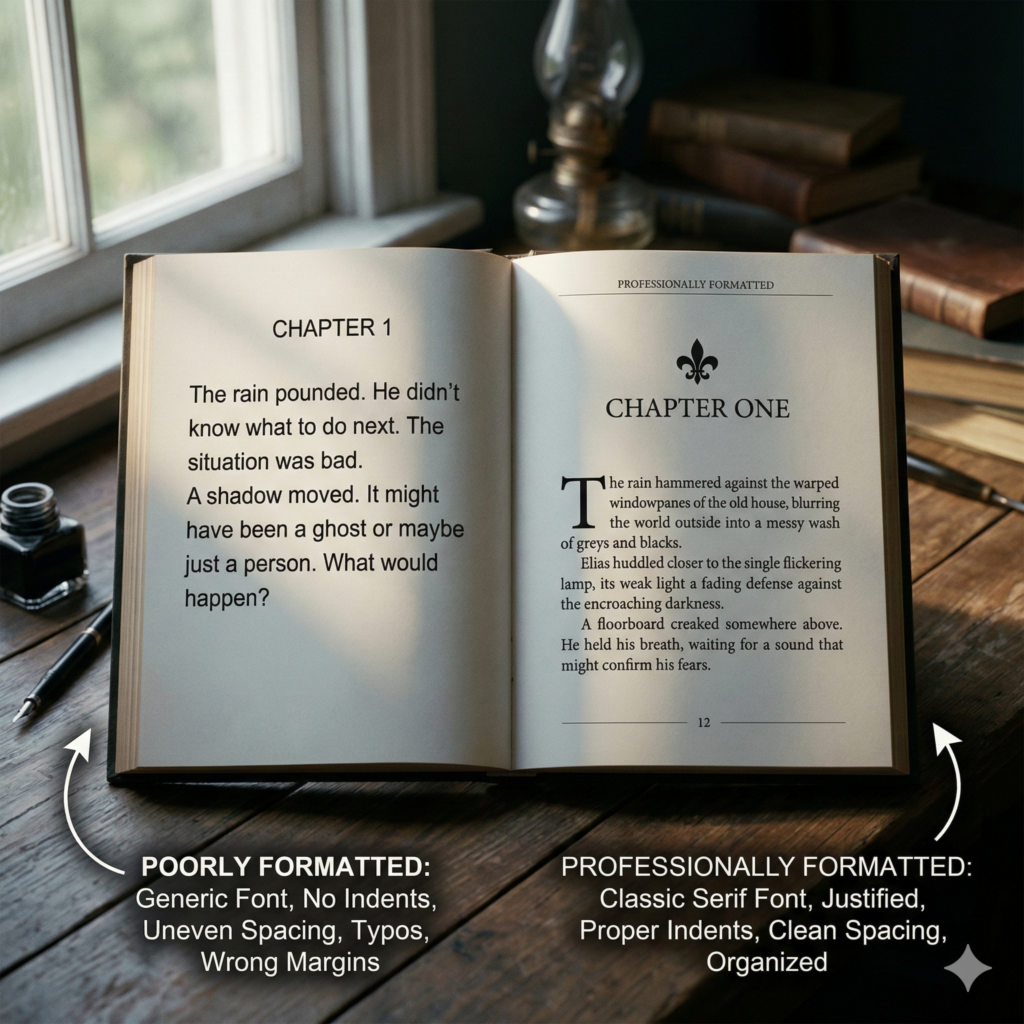
Readers judge books instantly.
A poorly formatted book signals:
-
Amateur publishing
-
Low quality
-
Lack of professionalism
Even if your content is amazing, formatting problems reduce reader trust.
A clean layout, consistent typography, and proper spacing help your book compete with traditionally published titles.
And when readers trust the presentation, they’re more likely to leave positive reviews.
My Recommended Self-Publishing Formatting Workflow
Here’s a simple process many successful indie authors follow:
Step 1: Write your manuscript in Word or Google Docs
Step 2: Import it into a formatting tool like Atticus
Step 3: Apply professional chapter styles
Step 4: Export ebook and print files
Step 5: Upload to Kindle Direct Publishing
This approach keeps writing and formatting organized, and prevents most publishing headaches.
 Final Thoughts
Self-publishing gives authors incredible freedom.
But that freedom also means you’re responsible for every step of the publishing process, including formatting!
The good news is that with the right tools and knowledge, formatting your book doesn’t have to be complicated.
Whether you use software like Atticus or hire a professional formatter, investing a little time (or money) in proper formatting can make the difference between:
-
A book that looks amateur
AND
-
A book that looks like it belongs on the bestseller shelf
And when your book looks professional, readers take it seriously.
Our Affiliate Links:
- Miblart – cover designs and other services
- Bookshop – curated book lists
- Scrivener – writing workflow
- Fiverr – find freelance talent
- Book Bolt – keyword search
- Publisher Rocket – keyword/category search
Our Referral Links:
- Upwork – more freelance talent
- Printful – print-on-demand merch
- Creative Fabrica – fonts and images
Join our community! Follow @TrailHawkPublishing for publishing tips and behind-the-scenes updates: